

FFT (Fast Fourier Transformation) Photoshop plugin by Alex V. Chirokov
<< Back to overview / Zurück zur Übersicht This is a very great freeware-plugin for photoshop. You can eliminate any form of regular patterns (e.g. removing the CMYK-raster from a scanned print).
It's hard to find the plugin on the net. And if you find it, you will likely have an old version, which have some problems with larger images.
I asked Alex Chirokov for a new version and he had a new version ready! (Thank you very much, Alex!)
It now works for images up to 4800x4800 pixels.
This page will save this great and free plugin for the future...
I asked Alex Chirokov for a new version and he had a new version ready! (Thank you very much, Alex!)
It now works for images up to 4800x4800 pixels.
This page will save this great and free plugin for the future...
And here's my tutorial ...
How to remove the CMYK raster from a scan (so that you will encounter no Moiré effect when printing it):
Original scan:
 |
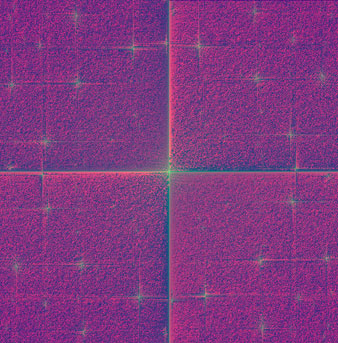
Applying the FFT filter:
 |
Switch to green channel:
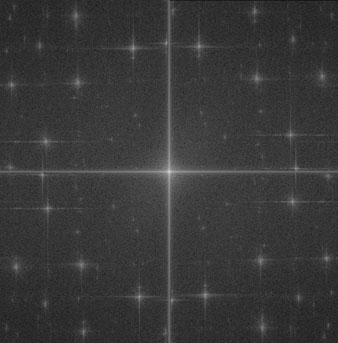 |
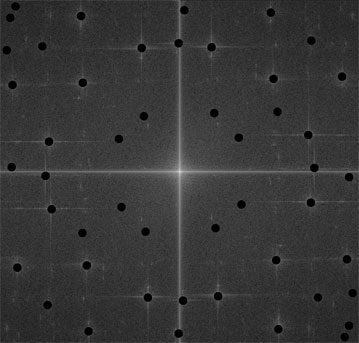
All white stars you can see are a representation of the regular CMYK-pattern. Cover all white stars with a black pen (except the center star!):
 |
Now switch back to RGB and apply the IFFT filter:
 |
Because the output of the FFT/IFFT is monochrome, you need to add the original colors. Move the original scan above the current layer, use a little Gaussian Blur (~1.5 pixels) and switch the layer mode to "Color":
 |
And done!
Here you can see the difference (I used bi-linear scaling for both pics so you can see the missing moiré effect)
 |
Kommentar von Barb Eaton am 16.11.2011
Will this filter work on a Mac 10.6.8? If not, is there one out there somwhere that will? Thank you.
Will this filter work on a Mac 10.6.8? If not, is there one out there somwhere that will? Thank you.
Kommentar von Cobarcore am 29.08.2012
Seems this filter does not work on 64 bit systems, any solution? Thanks!
Seems this filter does not work on 64 bit systems, any solution? Thanks!
Kommentar von bobbydazzler am 12.12.2012
Echo the comment about 64 bit systems....please will this be fixed so it works on 64 bit????
Echo the comment about 64 bit systems....please will this be fixed so it works on 64 bit????
Kommentar von Eric am 05.07.2013
use this for 64 bit (works with win8 64 Bit PS CS5 64 Bit):
http://www.retouchpro.com/forums/software/33084-here-fft-64-bit-photoshop-3.html#post316929
use this for 64 bit (works with win8 64 Bit PS CS5 64 Bit):
http://www.retouchpro.com/forums/software/33084-here-fft-64-bit-photoshop-3.html#post316929
Kommentar von James am 16.09.2013
Thanks so much for this plug-in! I had some old family photos that were printed on a grid-like paper and was able to get rid of the pattern entirely. :-)
Thanks so much for this plug-in! I had some old family photos that were printed on a grid-like paper and was able to get rid of the pattern entirely. :-)
Kommentar von ericking am 06.12.2013
Hi,
I cant understand how to use ifft(after it ,get a monochrome image)to produce a color image.Can you give details codes for these?
Hi,
I cant understand how to use ifft(after it ,get a monochrome image)to produce a color image.Can you give details codes for these?
Kommentar von another alex am 02.01.2015
Thank you and thanks Alex for this plugin. It worked really fine to me. <3
Thank you and thanks Alex for this plugin. It worked really fine to me. <3
Kommentar von David am 28.11.2015
I am able to run FFT and I see the star pattern. But I am unable to run IFFT - nothing happens....I don't get the hourglass that indicates processing. I am running Win 7, PS7.
Thx for helping. dqlevitt@gmail.com
I am able to run FFT and I see the star pattern. But I am unable to run IFFT - nothing happens....I don't get the hourglass that indicates processing. I am running Win 7, PS7.
Thx for helping. dqlevitt@gmail.com
Kommentar von John Russ am 29.07.2017
This really needs to be recompiled to run in 64 bits to work with the newer versions of PShop. And of course, it would be nice to have a Mac version.
This really needs to be recompiled to run in 64 bits to work with the newer versions of PShop. And of course, it would be nice to have a Mac version.
Kommentar von Nick am 28.09.2017
I need a Mac version. Please somebody release a Mac version for this. There is a demand for it. Thank you.
I need a Mac version. Please somebody release a Mac version for this. There is a demand for it. Thank you.
Kommentar von Jonas am 08.06.2018
Now 10 years later, I want to give a heads up that the plugins have been rewritten and updated.
It now has accompanying actions created to semi-automate the process and improve the results (it greatly speeds up the process as well). It also has native color support! :)
You can get it at http://ft.rognemedia.no/
(Unfortunately still no Mac version until someone with the right skill sets volunteers to adapt the plugin files; we have the source code so might not be too much work?).
Now 10 years later, I want to give a heads up that the plugins have been rewritten and updated.
It now has accompanying actions created to semi-automate the process and improve the results (it greatly speeds up the process as well). It also has native color support! :)
You can get it at http://ft.rognemedia.no/
(Unfortunately still no Mac version until someone with the right skill sets volunteers to adapt the plugin files; we have the source code so might not be too much work?).
Kommentar von Chris C. am 18.03.2021
Excellent for removing scan lines from a very poor photocopying process - Amazing results - wish I could post!
Excellent for removing scan lines from a very poor photocopying process - Amazing results - wish I could post!
Seite zuletzt geändert am: 23.01.2019
This is VERY interesting.
I believe with some further improvement to the plug-in this could be made a lot more user-friendly - no image size limitations would also be needed (until then we have to cut up our images). I will download this and try it out.